

Malta Invoice Coordination for Microsoft Power Automate
How Microsoft Power Automate Routes Invoice Workflows
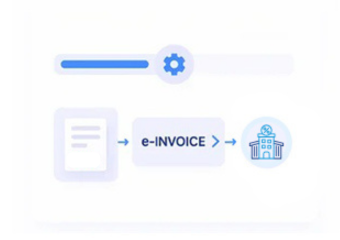
- Detect Billing Events: Microsoft Power Automate detects relevant billing events and starts the configured invoice workflow for processing.
- Gather Connected Records: Connected systems provide customer, supplier, account, and transaction information for complete invoice preparation.
- Structure Invoice Inputs: Advintek organizes incoming values into structured fields required for Malta invoice processing workflows consistently.
- Validate Required Fields: Validation checks identify missing, inconsistent, or unsuitable information before electronic invoice handling continues successfully.
- Process Approved Records: Approved records continue through controlled processing steps for document generation and delivery activities securely.
- Retain Workflow References: Completed invoice references remain associated with originating workflow records for future verification and review.
What Does the Power Automate Connector Enable?
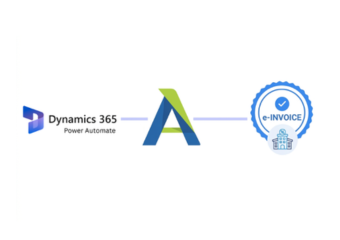
Advintek adds invoice-focused controls around Microsoft Power Automate, helping businesses connect automated triggers, approvals, documents, and source applications with Malta e-invoicing requirements while preserving complete workflow context.
- Automated invoice triggers start structured processing
- Approval outcomes guide invoice workflow decisions
- Source documents stay linked during processing
- Exceptions receive controlled review before continuation
Why Power Automate Users Choose Advintek
- Automated Trigger Handling: Responds to defined business events, reducing manual starts for recurring invoice processes.
- Approval Path Coordination: Connects invoice authorization steps with workflow decisions before records proceed toward processing.
- Exception Routing Control: Directs incomplete or unusual invoice records toward appropriate review steps before continuation.
- Document Intake Management: Organizes invoice-related files and information received through connected applications and automated workflows.
- Scheduled Invoice Processing: Supports recurring workflow schedules for regular billing activities across connected business systems.
- Workflow Audit Visibility: Preserves process context around invoice actions, decisions, and completed automation runs for review.
Specialized Malta Tools for Power Automate
Dataverse Data Actions
Uses structured Dataverse information within connected workflows supporting controlled invoice preparation processes.
Approval Response Tracking
Records approval outcomes so invoice workflows can reflect authorized business decisions consistently.
Desktop Flow Assistance
Supports interface-based automation where invoice information originates from systems without suitable APIs.
Malta Support for Automated ERP Workflows
Microsoft Power Automate supports varied ERP-connected processes, so Advintek aligns invoice automation with approvals, scheduled tasks, application data, and document-driven operations across connected business environments for consistent processing.
- Supports ERP-triggered invoice automation across applications
- Connects approvals with finance workflow decisions
- Handles scheduled billing processes through automation
- Preserves source context across connected systems
Create Your Compliant Invoice Workflow
Start Malta e-invoicing through your Power Automate workflows today.
Connect automated processes with structured invoice compliance.
Ready e-Invoice System
Frequently Asked Questions Power Automate e-Invoicing Malta
Which Microsoft Power Automate triggers can initiate invoice workflows?
Microsoft Power Automate workflows can start from defined business events, scheduled activities, or manually initiated actions. For Malta e-invoicing, Advintek can use those workflow events to begin invoice preparation, collect relevant ERP or application records, validate information, and continue processing without requiring finance teams to repeatedly initiate the same invoice sequence.
How does Microsoft Power Automate handle invoice approvals?
Approval actions can form part of an automated invoice workflow before processing continues. Advintek can associate approval outcomes with the relevant invoice record, allowing authorized decisions to remain connected to the transaction. This creates clearer workflow visibility for finance teams reviewing whether an invoice was approved before processing.
What ERP information can Microsoft Power Automate connect?
The information depends on the connected ERP and applications, but relevant invoice workflows may use customer records, transaction details, account information, document references, tax data, and approval results. Advintek organizes applicable information into structured invoice data while retaining relationships with the originating ERP-connected workflow.
Can scheduled Microsoft Power Automate flows support recurring invoices?
Yes. Scheduled flows can initiate recurring business processes at defined intervals. When connected with Advintek, these workflows can support recurring invoice preparation by retrieving applicable records, organizing invoice information, checking required fields, and continuing the configured Malta e-invoicing process without requiring repeated manual workflow initiation.
Why use Advintek with Microsoft Power Automate?
Microsoft Power Automate provides the automation framework, while Advintek focuses that automation around invoice processing and Malta e-invoicing requirements. Together, they can connect ERP records, workflow triggers, approvals, documents, validation steps, and invoice references, giving businesses a more organized path from automated business activity to structured electronic invoicing.